Cybersecurity Research Intern
Evaluated open-source SBOM and SCA toolchains. Executed deployment tests in air-gapped environments.
// AceofStades
Bhabha Atomic Research Centre (BARC) | Nov 2025 -- Jan 2026
Evaluated open-source SBOM and SCA toolchains. Executed deployment tests in air-gapped environments.
PyTorch Ecosystem | Open Source
Contributed to the PyTorch ecosystem, developing TensorRT compilation pipelines and improving FX graph optimizations.
Arch Linux | June 2025 -- Current
Coordinated package signoffs for [core] and [extra] repositories. Identified critical kernel regressions.
Python, LSTM, U-NET, ERA5, MODIS
OpenEnv, TRL (GRPO), Unsloth, Llama-3.2, PuLP
Rust, Macroquad, Serde, MPSC
Rust, Python, PyTorch, React, Three.js
Go, Electron, React, ONNX, XGBoost
Hardware, ZMK Firmware, 3D Printing
Advanced ocean analytics platform designed to transform oceanographic research.
My custom Arch Linux + Hyprland dotfiles.
Computer vision pipeline for detecting road lanes.
Top 100 out of 800 Teams | April 2026
Engineered a dynamic supply chain combinatorial orchestration environment to train agentic reasoning.
Region Finalist | 2025
Edge-computing smart collar (ESP32-C3) with IMU behavioral inference and Rust edge server.
1st Runner-up (2nd Place) | February 2025
Developed predictive XGBoost models to identify customer churn risk.
Consolation Place | March 2025
Built a multimodal deepfake detection system utilizing MTCNN.
Coursera
Click to view the certificate.
Coursera
Click to view the certificate.
MCT's Rajiv Gandhi Institute of Technology, Mumbai | Expected 2027
Prakash College of Commerce and Science | 2023
SVKM's CNM School | 2021
Rust | Python | Go | C++
Systems programming, machine learning, and tooling.
PyTorch | ONNX | TensorRT | XGBoost
Deep learning, computer vision, reinforcement learning, and inference optimization.
Linux | Tokio | Axum | Security Tooling
Linux systems, async services, air-gapped environments, and developer tooling.
ESP32-C3 | ZMK | Macroquad
Embedded devices, visualization tools, and custom hardware.
November 2025 -- January 2026
June 2025 -- Current


A cutting-edge full-stack application for real-time forest fire prediction, 3D simulation, and safe path planning using Deep Learning.
Forest-Fire is an integrated platform designed to assist in wildfire management and prevention. By leveraging satellite data, deep learning (U-Net), and pathfinding algorithms (D* Lite), this tool provides actionable insights into fire spread and safe evacuation routes.
The system consists of a robust FastAPI backend that serves predictions from a PyTorch-based model, and a modern Next.js frontend that visualizes data in 2D, offers simulation controls, and provides an interactive dashboard for decision-makers.
Research & Architecture: Read the comprehensive project documentation, including dataset engineering and model architectures, in the docs/project_overview.md file.
react-leaflet mapping interface allowing users to view dynamic Cellular Automata spreading atop real-world geographic bounds (Uttarakhand)..nc, .tiff, or .geojson disaster snapshots for instant AI inference and routing.The project follows a modern microservices-like architecture:
graph TD
    User[User] -->|Interacts| Client[Next.js Frontend]
    Client -->|HTTP/JSON| API[FastAPI Server]

    subgraph "Backend Services"
        API -->|Inference| Model[PyTorch U-Net]
        API -->|Pathfinding| Algo[D* Lite]
        API -->|Data| Store[Artifacts/Cache]
    end

    subgraph "Data Processing"
        Raw[Satellite/Weather Data] -->|Preprocessing| Model
    end
/
├── Frontend/           # Next.js Web Application
│   ├── app/            # App Router pages (Dashboard, Simulation, etc.)
│   ├── components/     # Reusable UI components (Three.js scenes, Charts)
│   └── ...
├── Server/             # FastAPI Backend
│   ├── app/
│   │   ├── main.py     # API Entry point
│   │   ├── d_star_lite.py # Pathfinding logic
│   │   └── ...
│   └── ...
├── Model/              # ML Research & Training
│   ├── src/            # Model definitions (UNet)
│   ├── weights/        # Trained model checkpoints
│   ├── dataset/        # Training data
│   └── ...
└── ...
Follow these instructions to set up the project locally.
git clone https://github.com/AceofStades/Forest-Fire.git
cd Forest-Fire
Navigate to the Server directory, create a virtual environment, and install dependencies.
cd Server

# Create virtual environment
python -m venv venv
source venv/bin/activate  # On Windows: venv\Scripts\activate

# Install dependencies
pip install -r requirements.txt

# Run the server
uvicorn app.main:app --reload --port 8000
The API will be available at
http://localhost:8000.
Open a new terminal, navigate to the Frontend directory.
cd Frontend

# Install dependencies
npm install  # or pnpm install / yarn install

# Run the development server
npm run dev
The application will be running at
http://localhost:3000.
If you wish to retrain the model or explore the datasets:
cd Model
pip install -r requirements.txt
# Check src/ for model definitions and train.py for training scripts
Contributions are welcome! Please feel free to submit a Pull Request.
git checkout -b feature/AmazingFeature)git commit -m 'Add some AmazingFeature')git push origin feature/AmazingFeature)This project is brought to you by:
Distributed under the MIT License. See LICENSE for more information.
title: openenv-dsc-co emoji: 📦 colorFrom: indigo colorTo: red sdk: docker app_port: 7860 pinned: true license: apache-2.0 tags:
dynamic supply chain combinatorial orchestration. a meta openenv-compliant rlvr/rlve environment. a 30-step multi-echelon supply chain graph verified by a deterministic pulp/cbc mixed-integer linear programming oracle. 100% api/json driven. single unprivileged docker container. hf space.
| artifact | url |
|---|---|
| live hf space (env server) | https://huggingface.co/spaces/AceofStades/dsc_co |
| hf space (training node) | https://huggingface.co/spaces/AceofStades/openenv-dsc-co-training |
| github source | https://github.com/CYCLOP5/metascaler-hack |
| trained lora adapter | https://huggingface.co/AceofStades/dsc-co-grpo-lora |
| final training curve | https://huggingface.co/AceofStades/dsc-co-grpo-lora/blob/main/training_curve.png (uploaded with adapter) |
| final metrics artifacts | [results/training_metrics.csv](results/training_metrics.csv), [results/training_metrics.json](results/training_metrics.json), [results/training_summary.json](results/training_summary.json) |
| trackio live training dashboard | https://huggingface.co/spaces/AceofStades/dsc-co-trackio (separate dashboard Space in trackio_space/) |
| blog post | BLOG.md |
| demo video | prefer BLOG.md for the full writeup; if you prefer video, https://youtu.be/bnp1fBDqrKI |
start here, then jump into whichever md interests you most:
| doc | what it shows |
|---|---|
| BOOTSTRAP.md | full setup, local eval, Space deploy, and A100 training path |
| BLOG.md | submission narrative: problem, verifier, training loop, proof |
| trackio_space/README.md | live Trackio dashboard Space for reward/loss monitoring |
| docs/architecture.md | runtime architecture, trainer/env/server data flow |
| docs/reward-spec.md | reward components, dense cap, terminal verifier signal |
| docs/milp-formulation.md | exact min-cost-flow MILP solved by CBC |
| docs/curriculum.md | four procedural difficulty tiers and reproducibility |
| docs/behavior-trace.md | qualitative before/after behavior trace for non-technical judges |
| docs/anti-hacking.md | hard gates against reward/specification hacking |
Open the runnable environment Space: https://huggingface.co/spaces/AceofStades/dsc_co
Click Reset, then use Step with these exact values:
Type:
call_tool

Tool Name:
query_network

Arguments:
{"source_id": "S0", "dest_id": "W0"}
Then ship inventory on the discovered edge:
Type:
call_tool

Tool Name:
dispatch_inventory

Arguments:
{"routes":[{"src":"S0","dst":"W0","qty":20}]}
Then advance the simulator:
Type:
call_tool

Tool Name:
advance_cycle

Arguments:
{}
Equivalent raw action payload:
{"type":"call_tool","tool_name":"query_network","arguments":{"source_id":"S0","dest_id":"W0"}}
| aspect | value |
|---|---|
| action space | 3 mcp tools, strict pydantic v2 validation |
| observation | typed json, partial-observable via query_network |
| horizon | 30 discrete steps |
| reward | dense shaping (≤ 0.4) + terminal clip(opt/agent, 0, 1) |
| verifier | coin-or cbc milp, zero-variance signal |
| trainer | trl grpo + unsloth + llama-3.2-3b-instruct qlora |
| curriculum | 4 procedurally-generated tiers with ema gating |
plain english: this is a store-shelf problem. the planner has to keep retailers stocked without wasting warehouse and supplier inventory too early. a bad planner panic-ships whatever is closest, looks good for a few turns, then runs out later and pays shortage penalties. a better planner sends smaller shipments early enough for lead time and keeps replenishment moving.
llms default to step-wise greedy decisions. give a 7b instruct model a 30-step supply chain and early moves permanently truncate the viable solution space. this env measures and trains through that failure mode with a zero-variance, math-optimal reward.
reward path diagram
before and after behavior trace
caption: concrete tier-1 seed-7 replay. the reactive baseline over-ships early and ends at terminal reward 0.423; the planned verifier replay sends smaller timed batches and reaches 0.959. see docs/behavior-trace.md. the final trained run improved terminal MILP reward from 0.052 to 0.226; raw trained completions were not preserved because DSC_LOG_COMPLETIONS=0.
| measurement | value |
|---|---|
| baseline greedy gap (tier 1, n=5) | 159% |
| baseline zero-op gap (tier 1, n=5) | 448% |
| milp-replay gap (tier 1, n=5) | 7% |
| gradient headroom | ~0.55 terminal reward points |
baseline terminal reward
Final GRPO evidence run: 400 steps, 2,000 prompts, 8 generations per prompt, max_completion_length=768, Llama-3.2-3B-Instruct 4-bit QLoRA via Unsloth on an A100 Space. Raw artifacts are committed under results/ and mirrored in the LoRA repo.
| metric | first logged step | final step | best / aggregate |
|---|---|---|---|
| combined reward | 0.622 | 1.304 | max 1.365 |
| cumulative env reward | 0.505 | 0.852 | last-25 mean 0.855 |
| terminal MILP reward | 0.052 | 0.226 | max 0.241 |
| reward std | 0.387 | 0.079 | frac_reward_zero_std=0 at final |
| GRPO train loss | — | -0.049 | 400-step run |
| runtime | — | 4h 51m | 0.023 steps/sec |
final GRPO training curve
caption: the model moves from sparse/low terminal verifier reward to stable non-zero MILP terminal reward while maintaining non-zero reward variance and gradients. The high completion clipping rate reflects inefficient stopping, but terminal reward remains active because valid parsed actions reach the 30-step verifier.
reward components
caption: the final metrics CSV is preserved under results/, so this plot is reproducible without relying on transient Space logs or screenshots.
training health
caption: reward variance remains non-zero and KL stays controlled through the final run.
completion diagnostics
caption: the model often uses the full completion budget, but parsed action sequences still reach terminal verifier scoring.
For a full setup guide, including local environment checks, OpenEnv deployment, and the intended Hugging Face A100 training workflow, see BOOTSTRAP.md.
make install
make test
make eval N=10 TIERS="1 2"
make viz
make serve
then from a second shell:
python client.py reset --tier 1 --seed 7
python client.py query S0 W0
python client.py dispatch S0 W0 50
python client.py advance
python client.py tools
live hf space: https://huggingface.co/spaces/AceofStades/dsc_co
reproduce the deploy:
huggingface-cli login
openenv push -r AceofStades/dsc_co --exclude .openenvignore
-r (aka --repo-id) takes username/env-name. --exclude .openenvignore is required — the cli's default ignore is only .*, __pycache__, *.pyc, so your local env/ venv would otherwise upload (~400 mb of compiled .so + cbc binaries = 500 error from hf).
optional flags: --private, --base-image ghcr.io/meta-pytorch/openenv-base:latest, --hardware cpu-basic, --env-var KEY=VAL, --secret KEY=VAL.
manual docker alternative:
docker build -t openenv-dsc-co .
docker run --rm -p 7860:7860 openenv-dsc-co
the hf space uses port 8000 by default (openenv.yaml). the root Dockerfile is wired for port 7860 if you deploy directly as a plain docker space.
we use huggingface spaces as on-demand, high-vram gpu compute nodes for grpo training. The intended full training path is the root Dockerfile on a Hugging Face A100 Docker Space. The notebooks in notebooks/ are provided for reference and experimentation, but the final evidence run was trained through the Docker Space workflow.
workflow:
HF_TOKEN — a write-scope token from https://huggingface.co/settings/tokensDSC_HF_REPO — AceofStades/dsc-co-grpo-lora (where the trained lora will be pushed) git remote add space https://huggingface.co/spaces/<your-user>/<your-space>
git push space master:main
Dockerfile, spin up a lightweight fastapi server (app.py) to satisfy the space's port 7860 health check, and kick off train.py in the background. check the space logs to watch unsloth run!training stack:
unsloth/Llama-3.2-3B-Instruct-bnb-4bit 4-bit qlora, r=32num_generations=4, max_completion_length=512, beta=0.04; override with DSC_NUM_GEN, DSC_MAX_COMPLETION, DSC_BETADSC_MAX_STEPS, DSC_DATA_N, DSC_BATCH_SIZE, DSC_GRAD_ACCUM, DSC_LR, DSC_EPOCHS, DSC_TEMP, DSC_SAVE_STEPSDSC_RESUME=1 to resume the latest checkpoint in DSC_OUT_DIRvllm is installed; otherwise training falls back to the standard unsloth pathtrain.py locally replays JSON tool actions through DSCToolEnv so rewards, loss, and gradients remain non-zerotraining_metrics.json, training_metrics.csv, and training_curve.png alongside the LoRA adaptertrackio.log({...}) streams metrics to the trackio dashboard.DSC_LOG_COMPLETIONS=1 on future runs to preserve exact trained JSON action traces for side-by-side qualitative demos.final HF Space evidence run preset:
DSC_MAX_STEPS=400
DSC_DATA_N=2000
DSC_NUM_GEN=8
DSC_MAX_COMPLETION=768
DSC_SAVE_STEPS=50
DSC_RESUME=0
DSC_DEBUG=0
DSC_LOG_COMPLETIONS=0
DSC_TRACKIO=openenv-dsc-co
DSC_TRACKIO_SPACE=AceofStades/dsc-co-trackio
reload the trained adapter anywhere with:
from unsloth import FastLanguageModel
model, tok = FastLanguageModel.from_pretrained(
    "AceofStades/dsc-co-grpo-lora",
    max_seq_length=8192, load_in_4bit=True, fast_inference=True,
)
FastLanguageModel.for_inference(model)
canonical openenv multi-mode deployment layout:
openenv-dsc-co/
├── BOOTSTRAP.md              full setup, local eval, deployment, and A100 training guide
├── pyproject.toml            package metadata, OpenEnv/core deps, pytest pythonpath
├── uv.lock                   pinned local/OpenEnv dependency resolution
├── openenv.yaml              OpenEnv manifest: app server.app:app on port 8000
├── __init__.py               package marker for OpenEnv packaging
├── models.py                 root re-export shim for OpenEnv structural checks
├── client.py                 CLI for reset/query/dispatch/advance/tools/health
├── app.py                    training Space health server that starts train.py in a thread
├── README.md                 main judge-facing overview, links, examples, results
├── BLOG.md                   short submission writeup / narrative
├── Makefile                  common install/test/eval/viz/serve/docker/train commands
├── Dockerfile                GPU training Space image; launches app.py then train.py
├── .gitignore                local cache/output ignore rules
├── .dockerignore             keeps local envs, outputs, and trackio_space out of training image
├── .openenvignore            keeps training-only/local files out of OpenEnv env pushes
├── requirements.txt          environment/runtime deps: fastapi, openenv, pulp, matplotlib
├── requirements-train.txt    cuda training deps: torch, trl, unsloth, trackio
├── server/
│   ├── __init__.py
│   ├── app.py                OpenEnv/FastAPI app; browser JSON-argument adapter; fallback routes
│   ├── Dockerfile            openenv-base multi-stage build for `openenv push`
│   ├── dsc_environment.py    DSCEnv(MCPEnvironment) + 4-tier curriculum + 3 fastmcp tools
│   ├── models.py             pydantic v2 schemas (DSCAction RootModel, strict int qty)
│   ├── solver.py             pulp time-expanded min-cost flow + greedy baseline
│   └── policies.py           zero_op, greedy, optimal_replay baseline rollouts
├── tests/
│   ├── __init__.py
│   ├── test_models.py        strict-int qty, action envelope parsing, observation schema
│   ├── test_env.py           reset shapes, anti-hack gates, valid flow, horizon termination
│   └── test_solver.py        milp correctness, tier shapes, bipartite edges
├── notebooks/
│   ├── train_hf_space.ipynb  reference notebook; final training used root Dockerfile on HF A100
│   └── train_kaggle.ipynb    alternate experiment notebook, not the canonical final run path
├── docs/
│   ├── architecture.md
│   ├── reward-spec.md
│   ├── milp-formulation.md
│   ├── curriculum.md
│   ├── behavior-trace.md
│   └── anti-hacking.md
├── assets/
│   ├── before_after_trace.svg qualitative reactive vs planned behavior trace
│   ├── reward_path.svg       reward/verifier flow diagram
│   ├── completion_diagnostics.png completion length and clipping diagnostics
│   ├── gap_hist.png          baseline optimality gap histogram
│   ├── reward_components.png final run reward component curves
│   ├── training_health.png   reward variance and KL diagnostics
│   ├── terminal_bars.png     baseline terminal reward comparison
│   └── training_curve.png    final GRPO reward/loss curve
├── results/
│   ├── training_metrics.csv  final LoRA repo metrics export
│   ├── training_metrics.json final LoRA repo metrics export
│   └── training_summary.json final run summary
├── stufftodo/
│   └── demo_animation.html   local animation page used for the demo video
├── trackio_space/
│   ├── README.md             Trackio dashboard Space card/deploy notes
│   ├── app.py                live Trackio dashboard app
│   └── requirements.txt      Trackio dashboard dependency
├── train.py                  HF Space GRPO training, local replay fallback, artifact upload
├── eval.py                   deterministic baseline rollout harness -> eval.json
└── viz.py                    renders gap, terminal, trajectory, and training curves
deep dive: docs/architecture.md
| tool | args | semantics |
|---|---|---|
query_network |
source_id: str, dest_id: str |
returns {exists, lead_time, unit_cost, capacity} |
dispatch_inventory |
routes: [{src, dst, qty}], max 8 |
strict int qty ≥ 1; deducts inv, schedules shipment |
advance_cycle |
none | ticks time, processes arrivals, deducts demand, accrues costs; finalize at step 30 |
max 5 calls per cycle; advance_cycle resets the per-cycle counter.
{
  "step": 0,
  "network_status": "nominal" | "disrupted",
  "nodes": [
    {"id", "type": "supplier" | "warehouse" | "retail",
     "inventory", "max_capacity", "holding_cost", "demand_forecast"}
  ],
  "pipeline": [{"src", "dst", "qty", "arrival_step"}],
  "reward": float, "done": bool,
  "metadata": {"tier", "agent_cost", "optimal_cost", "terminal", "calls_this_cycle"}
}
deep dive: docs/reward-spec.md
| component | type | value | trigger | cap |
|---|---|---|---|---|
| r_schema | dense | +0.05 | valid pydantic-parsed tool call | sum dense ≤ 0.4 |
| r_valid | dense | +0.10 | dispatch with existing edge + inv sufficient | sum dense ≤ 0.4 |
| r_terminal | sparse | clip(opt/agent, 0, 1) |
step == 30 | — |
| r_neg_exploit | terminal | −1.0 + done | qty ≤ 0 or float | — |
| r_phantom_edge | terminal | 0 + done | dispatch over edge not in adjacency | — |
deep dive: docs/curriculum.md
| tier | suppliers | warehouses | retail | lead time | demand | disruptions |
|---|---|---|---|---|---|---|
| 1 | 1 | 1 | 1 | L=1 | static | none |
| 2 | 3 | 5 | 10 | L=1 | gaussian | none |
| 3 | 5 | 10 | 20 | L∈[1..5] | gaussian | capacity jitter |
| 4 | 7 | 14 | 28 | L∈[1..7] | seasonal | severe strikes |
deep dive: docs/milp-formulation.md
min   Σ_{e,t} c_e · x[e,t]
    + Σ_{n,t} h_n · I[n,t]
    + Σ_{n,t} P   · u[n,t]

s.t.  I[n, 0]    = I0_n
      I[n, t+1] = I[n, t] + arrivals(n, t) − departures(n, t) − d[n, t] + u[n, t]
      I[n, t]   ≤ cap_n
      x[e, t]   ≤ cap_e
      Σ_{e: src=s, t} x[e, t] ≤ sup_cap     (supplier)
      arrivals(n, t) = Σ_{e: dst=n, t−L_e ≥ 0} x[e, t − L_e]
solver: pulp.PULP_CBC_CMD(msg=0, timeLimit=30).
deep dive: docs/anti-hacking.md
| vector | defense |
|---|---|
| negative / zero / float qty | pydantic strict=True, ge=1 + pre-mutation _is_underflow_qty check → reward −1.0, done |
| cyclic reward farming | MAX_CALLS_PER_CYCLE=5 + DENSE_CAP=0.4; holding cost > dense reward |
| phantom edge hallucination | immutable _adjacency: frozenset built at reset → dispatch off-graph ends episode |
make eval N=20 TIERS="1 2 3"
make viz
produces:
eval.json with per-rollout cost, gap, terminalassets/gap_hist.png per-tier gap histogramsassets/terminal_bars.png mean terminal reward bars by policy × tierbaseline optimality gap histogram
caption: non-trained baseline policies leave large optimality gaps; optimal_replay is the MILP-derived upper-bound behavior.
baseline terminal reward by policy
caption: terminal reward has clear headroom for RL; greedy behavior is far below the MILP replay ceiling on tier 1.
baseline numbers on 5 seeds (tier 1 / tier 2):
| policy | tier 1 gap / terminal | tier 2 gap / terminal |
|---|---|---|
| zero_op | 4.48 / 0.19 | 1.01 / 0.51 |
| greedy | 1.59 / 0.39 | 0.35 / 0.75 |
| optimal_replay | 0.07 / 0.94 | 0.02 / 0.98 |
greedy ↔ optimal_replay gap is the rl learning target (~0.55 terminal reward points on tier 1).
make test
43 tests across models, env, solver:
optimal_cost ≤ greedy_cost on random tier-1 scenariosmeta pytorch openenv team. huggingface trl team. unsloth team. coin-or cbc. apache-2.0.
A lightweight, from-scratch Neural Network library implemented in Rust, featuring a built-in real-time interactive GUI visualizer built with Macroquad.
Watch the network learn the MNIST dataset in real-time with color-coded neuron activations, and control the training dynamically through the UI.
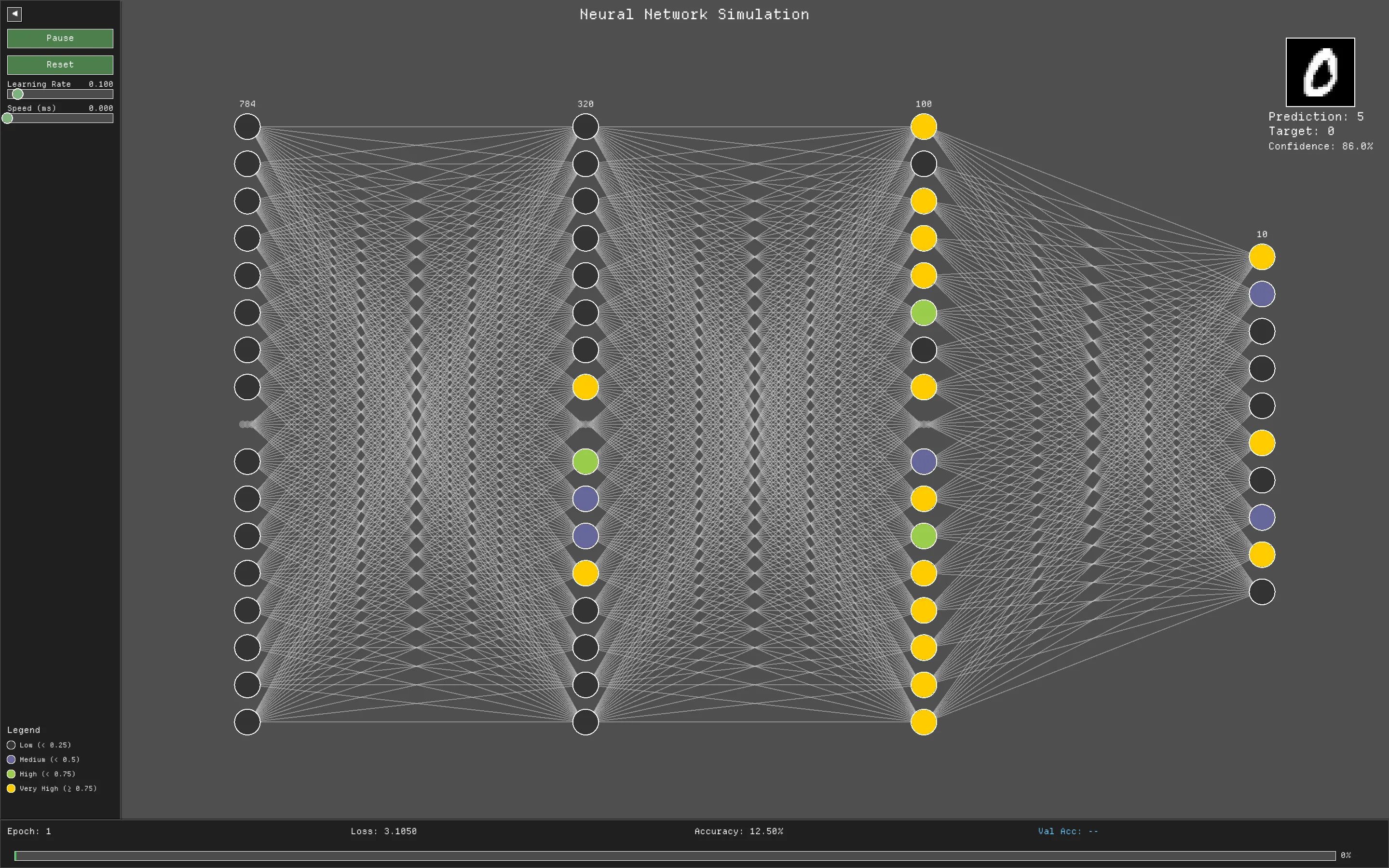
serde).mnist-dataset folder containing the idx-ubyte files should be present in the root directory).Clone the repository and build using Cargo:
cargo build --release
You can run the application directly with default settings:
cargo run --release
Rust-NN is highly configurable via CLI arguments:
Options:
  -t, --topology <TOPOLOGY>...  Network layer sizes [default: 784 320 100 10]
  -w, --screen-width <WIDTH>    Initial screen width [default: 1440.0]
  -e, --screen-height <HEIGHT>  Initial screen height [default: 900.0]
  -l, --learning-rate <LR>      Initial learning rate [default: 0.1]
  -b, --batch-size <SIZE>       Training batch size [default: 32]
  -E, --epochs <EPOCHS>         Number of training epochs [default: 5]
  -p, --path <PATH>             Path to save/load the model JSON file
  -h, --help                    Print help
  -V, --version                 Print version
Example:
Train a smaller network with a larger batch size and save it to model.json:
cargo run --release -- -t 784 128 10 -b 64 -l 0.05 -p model.json
This project is licensed under the MIT License - see the LICENSE file for details.
Created for Datathon 2026 at K. J. Somaiya College of Engineering by Team Low Taper Fade.
An advanced financial stability platform combining Graph Neural Networks, Strategic Agent Modeling, and High-Performance Simulations.
This project is a comprehensive toolkit for analyzing systemic risk in banking networks. It goes beyond static stress testing by modeling the dynamic, endogenous nature of financial contagion—where one bank's distress triggers fire sales, liquidity runs, and defaults across the entire system.

Watch the entire demonstration of this project on YouTube: https://youtu.be/uk9riC6LneA
At the heart of the engine lies a Monte Carlo-based Intraday Liquidity Model. Unlike traditional static models, we simulate the banking system in discrete time steps to capture the rapid unfolding of a crisis.
panic_threshold, they withdraw funding.ndarray for matrix operations, offering 10-50x speedups over pure Python. This allows us to run thousands of Monte Carlo trajectories in seconds.We utilize a curated dataset of approximately 4,500 banks from the USA and European Union, constructed to reflect real-world interbank connectivity distributions.
Visual Coding: In our simulation visualizations:
Simulation Scale: While our backend dataset contains ~4,500 nodes, the interactive 3D simulation renders a sub-graph of the top ~500 most systemic nodes to ensure smooth performance in the browser while capturing the most critical contagion channels.
Watch contagion spread in real-time. The visualizer shows shock propagation, capital depletion, and the resulting defaults.
Static view of a contagion cascade:
A detailed view of individual bank balance sheets, leverage ratios, and computed GNN risk scores.
react-force-graph-3d), Recharts, Plotly.js./
├── backend/
│ ├── api.py # FastAPI entry point
│ ├── ml_pipeline.py # GNN training and inference logic
│ ├── simulation_engine.py # Core contagion physics (Python fallback)
│ ├── strategic_model.py # Bayesian game agents
│ ├── encs_rust/ # Rust source code for high-perf simulation
│ │ ├── src/lib.rs # Monte Carlo & Intraday logic in Rust
│ │ └── Cargo.toml # Rust dependencies
│ └── data/ # Network datasets and models
├── frontend/
│ ├── src/
│ │ ├── components/ # React components (NetworkGraph3D, etc.)
│ │ ├── pages/ # Main application views
│ │ └── services/ # API integration
└── .github/ # CI/CD and Agent definitions
The backend handles the simulation logic and API.
cd backend

# Create a virtual environment
python -m venv venv
source venv/bin/activate  # On Windows: venv\Scripts\activate

# Install dependencies
pip install -r requirements.txt

# (Optional) Build the Rust extension for maximum performance
# Requires Rust toolchain (cargo)
# pip install maturin
# cd encs_rust && maturin develop --release && cd ..

# Start the API server
uvicorn api:app --reload --port 8000
The frontend provides the interactive dashboard.
cd frontend

# Install dependencies
npm install

# Start the development server
npm run dev
Open your browser to http://localhost:5173 (or the port shown in your terminal).
We welcome contributions! Please see the issue tracker for outstanding tasks.
git checkout -b feature/AmazingFeature).Distributed under the GNU General Public License v3.0. See LICENSE for more information.





DZap is a cross-platform utility designed to securely sanitize storage media (HDDs, SSDs, NVMe, USBs) to NIST 800-88 standards.
WARNING: This software is designed to permanently and irretrievably destroy data. Use with extreme caution. The developers are not responsible for accidental data loss.
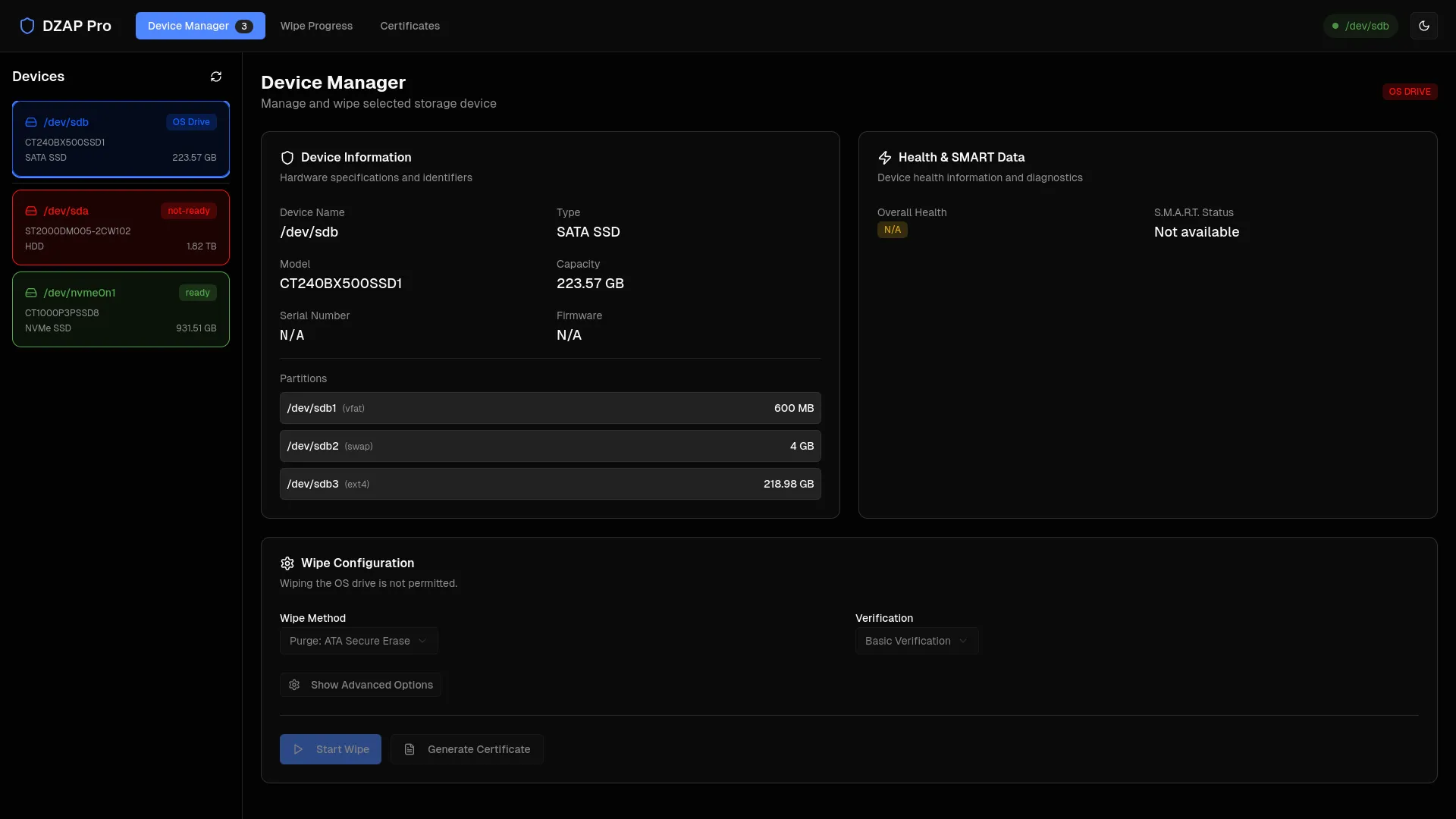
ATA Secure Erase and NVMe Format for modern SSDs.pkexec) only when necessary.Before installing, ensure your Linux system has the following dependencies:
smartmontools, hdparm, nvme-cli, polkitgo (v1.21+), npm / node, gcclibonnxruntime (often available as onnxruntime or libonnxruntime-dev) (Disabled for now)Arch Linux:
sudo pacman -S go npm smartmontools hdparm nvme-cli onnxruntime
Ubuntu/Debian:
sudo apt install golang nodejs npm smartmontools hdparm nvme-cli libonnxruntime-dev
Because DZap uses a system-level backend service, installation is a two-step process.
Clone the repository and build the source code.
npm install
npm install cross-env --save-dev
npm run start:frontend
In another terminal run:
cd server
sudo go run .
Run the provided installer script. This copies the Go binary to a secure system location (/usr/local/bin) and installs the PolicyKit rules allow the UI to communicate with it.
sudo ./install.sh
Once installed, you can run the application like any other Linux program.
dist/ folder (or wherever you moved the AppImage)../DZap\ Secure\ Wiper-1.0.0.AppImage
sudo to run the AppImage).For developers contributing to DZap, use the development mode which enables hot-reloading.
Recommended Workflow:
cd server
sudo go run .
npm run start:frontend
DZap/
├── electron/          # Main process logic (window creation, IPC)
├── frontend/          # React UI (Tailwind, Components, State)
├── server/            # Go Backend
│   ├── api/           # HTTP Handlers
│   ├── core/          # Drive detection, Wiping logic, AI prediction
│   └── realtime/      # WebSocket hub
├── model/             # ONNX AI models and feature maps
└── install.sh         # System installer script (In Development)
Contributions are welcome! Please follow these steps:
git checkout -b feature/AmazingFeature).git commit -m 'Add some AmazingFeature').git push origin feature/AmazingFeature).Distributed under the MIT License. See LICENSE for more information.
No README found for this repository.
🌊 FloatChat - AI-Powered Ocean Data Exploration
🔴 Live Demo: FloatChat Web App (Hosted on Amazon S3)
FloatChat is an advanced ocean analytics platform designed to transform oceanographic research. By combining interactive 3D visualization with AI-driven natural language processing, FloatChat allows researchers and enthusiasts to explore complex ARGO float data, visualize global ocean monitoring networks, and uncover insights through simple conversation.
| Landing Page | Interactive Globe |
|---|---|
 |
|
| AI Chat Interface | Data Dashboard |
|---|---|
|
|
Three.js and @react-three/fiber.Recharts..nc (NetCDF) files directly through the platform.FloatChat is deployed using a decoupled, highly scalable, and secure 10-service AWS architecture, designed to balance performance with strict security and auditing compliance.
.nc files into dataframes, queries the DynamoDB state, constructs the LLM prompts, and streams the AI response back to the client. It scales instantly to zero, costing absolutely nothing when the app is idle.t2.micro instance running the Ollama engine. Instead of crashing a low-memory instance with heavy local model weights, it acts as a lightweight proxy interface to the glm-5:cloud LLM, ensuring 100% stability and sub-second generation speeds.graph TD
User([User / Browser]) -->|HTTPS Request| CF[Amazon CloudFront]
CF -->|Static Assets| S3_Front[Amazon S3: Frontend Hosting]
User -->|Authentication| Cognito[Amazon Cognito]
User -->|API / Chat Request| WAF[AWS WAF]
WAF --> APIGW[Amazon API Gateway]
APIGW -->|Trigger| Lambda[AWS Lambda: Python Backend]
Lambda <-->|Fetch/Store User State| DynamoDB[(Amazon DynamoDB)]
Lambda <-->|Upload/Download Data| S3_Data[(Amazon S3: User Data)]
Lambda -->|LLM Prompt| EC2[Amazon EC2: Ollama AI Proxy]
EC2 -.->|External API| LLM[Cloud LLM Model]
Lambda -.->|Logs| CW[Amazon CloudWatch]
subgraph Audit & Governance
CT[AWS CloudTrail] -.->|Logs Activity| S3_Front
CT -.->|Logs Activity| S3_Data
CT -.->|Logs Activity| DynamoDB
end
For more detailed information, see the Deployment Architecture Documentation.
Built with modern React ecosystem tools for performance and interactivity.
A robust Python backend handling data processing and AI logic.
FloatChat/
├── public/                 # Static assets (images, textures, models)
├── server/                 # Python FastAPI Backend
│   ├── app/                # Application logic
│   │   ├── ai_core.py      # LLM & Vector DB handling
│   │   ├── database.py     # Database connection & queries
│   │   ├── processing.py   # NetCDF & Dataframe processing
│   │   └── visualizations.py # Map & Graph generation
│   ├── main.py             # Server entry point
│   ├── requirements.txt    # Python dependencies
│   └── *.nc / *.db         # Local data storage
├── src/                    # Next.js Frontend Source
│   ├── app/                # App Router pages & layouts
│   ├── components/         # React Components
│   │   ├── ui/             # Shadcn reusable UI elements
│   │   └── ...             # Feature components (Globe, Chat, etc.)
│   ├── contexts/           # Global state providers (Auth)
│   ├── hooks/              # Custom React hooks
│   ├── lib/                # Utility functions
│   └── styles/             # Global CSS & Tailwind config
├── package.json            # Frontend dependencies
├── tailwind.config.ts      # Tailwind configuration
└── tsconfig.json           # TypeScript configuration
Clone the repository:
git clone [https://github.com/vishalbarai007/floatchat.git](https://github.com/vishalbarai007/floatchat.git)
cd floatchat
Setup Backend:
cd server
python -m venv venv
source venv/bin/activate  # On Windows: venv\Scripts\activate
pip install -r requirements.txt
uvicorn main:app --reload
Setup Frontend:
# Open a new terminal in the root directory
npm install
npm run dev
.nc) file (e.g., ARGO float data).Contributions are welcome! Please follow these steps:
git checkout -b feature/AmazingFeature
git commit -m 'Add some AmazingFeature'
git push origin feature/AmazingFeature
Distributed under the MIT License. See LICENSE for more information.
Built with 💙 by Jr. Coding Saints
No README found for this repository.
No README found for this repository.
April 2026
2025
February 2025
March 2025
Expected graduation: 2027
Completed in 2023
Completed in 2021

